
Failure
When attempting to retrieve the properties or statistics for certain HP printers, the portal displays the following log entry:
System.Net.Http.HttpRequestException: The SSL connection could not be established, see inner exception.
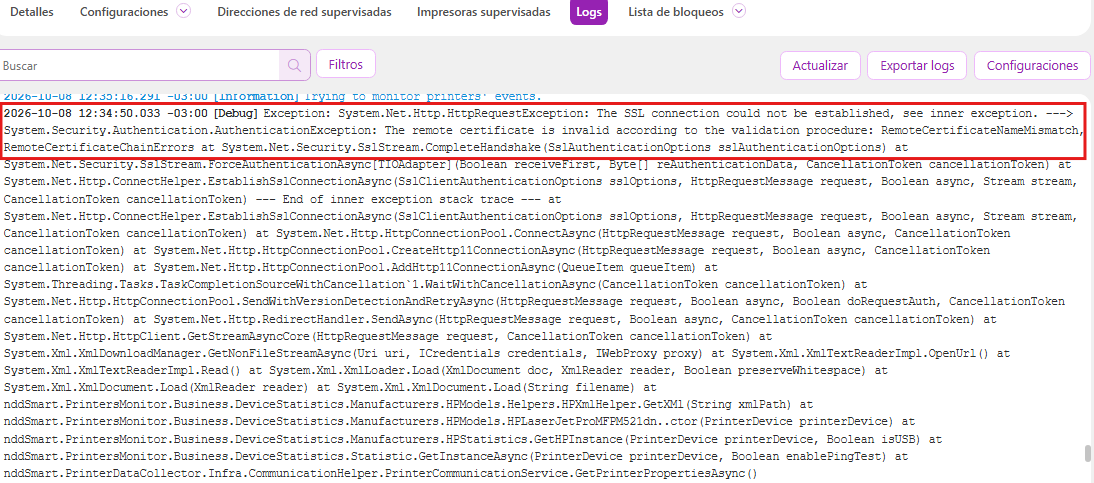
The inner exception indicates a failure in validating the remote certificate:
System.Security.Authentication.AuthenticationException: The remote certificate is invalid according to the validation procedure: RemoteCertificateNameMismatch, RemoteCertificateChainErrors
The error occurs while attempting to establish an HTTPS connection with the printer.
Cause
The failure occurs due to the HP printer’s HTTPS certificate/authentication configuration.
During communication, the portal validates the SSL/TLS certificate presented by the printer. This validation fails when the certificate does not meet the expected criteria, resulting in the following errors:
-
RemoteCertificateNameMismatch: the name presented in the certificate does not match the address or name used in the connection to the printer.
-
RemoteCertificateChainErrors: the certificate’s certificate chain could not be validated correctly.
As a result, the HTTPS connection is rejected, preventing communication with the printer.
Solution
On the HP printer itself, disable the certificate/HTTPS authentication configuration related to the failure, as instructed below:
-
Access the HP printer’s management interface
-
Locate the Security, HTTPS, SSL/TLS, or Certificate settings
-
Disable the certificate/HTTPS authentication configuration, according to the options available on your printer model
-
Save the changes
-
Restart the printer if prompted by the equipment
-
Try the communication/data collection process again through the portal
-
Verify that the error has been resolved
Once you disable the HTTPS certificate/authentication configuration, communication with the printer should be restored, and the portal will be able to read the device’s information.