
In the print outsourcing market, where supplies represent one of the largest sources of cost in contracts, searching for efficiency without compromising quality is essential. With this in mind, NDD Orbix offers EcoPrint, a 100% cloud-based feature that applies savings to printed documents, reducing supply consumption and promoting a more sustainable and profitable operation.
This feature allows you to adjust the application of toner or ink in printouts without affecting document legibility. Savings can range from 1% to 60%, depending on customer needs and operational objectives.
Aligned with ESG principles, EcoPrint contributes to reducing the environmental footprint of printing operations. Lower supply consumption means less waste, less transportation, and longer equipment life. Companies that adopt EcoPrint strengthen their corporate image and can use the reports generated as support for audits and communication with the market.
To ensure optimal performance, EcoPrint requires the use of PCL6 language drivers. Although it operates independently, the feature can be used in conjunction with NDD Orbix's Remote administration of queues and drivers functionality, which ensures that all queues are correctly configured to support the required parameters.
Explore more about this feature
Access the detailed documentation to explore the EcoPrint feature in more detail:
Key pain points we help solve

Reduced contract margins due to high supply consumption

Waste of toner/ink in uncontrolled environments

High
logistics and
replenishment costs
Key benefits for your operation

Increased
contract
profitability

Visibility and control through detailed reports
Direct
reduction in supplies consumption

Reduction in unnecessary maintenance

Alignment with ESG practices, strengthening your corporate image

Strategic
purchasing
planning
What makes our solution different from others
Intelligent
fading
process that
preserves print
quality
Compatibility
with
multiple
manufacturers

Centralized and scalable management, ideal for distributed operations
How EcoPrint works
The first step is to configure printer monitoring, a mandatory step in all scenarios. If the saving rule involves print queues as members, it will also be necessary to configure remote administration of queues and drivers.
The operation begins with the installation of the DCA and Cloud Connector agent on the devices that will receive the saving rules. The agent must be installed on the device where the print spool is generated. If you use a print server, install the agent on that server. Otherwise, install the agent on each computer where the savings will be applied.
Next, you must enable and configure the EcoPrint service on the NDD Orbix portal. In this step, you define the rules that determine which customers will have their environments managed by the installed agent.
When you install the DCA and Cloud Connector agent and enable and configure the EcoPrint service, the NDD - Queues Monitor is automatically installed as a component required for the NDD - Supply Watch service to function. During installation, a folder named QueuesMonitor is created in the root of the agent directory. This folder is essential for the solution to function and must not be removed.
The NDD - Queues Monitor acts as an orchestrator between the service and the NDD - Print Processor, and is responsible for its installation, configuration, and management in the print queues. In addition, it ensures that the NDD - Print Processor remains installed in the queues, even if changes occur or removal attempts are made, keeping the environment consistent and ready for the proper functioning of EcoPrint.
The NDD - Print Processor is a library (DLL) installed on all print queues, including those not linked to EcoPrint. Its function is to intercept the flow of print jobs and enable communication with systems, allowing information to be processed without impacting or interrupting printing.
Warning
When removing the DCA and Cloud Connector, the behavior of the NDD - Print Processor depends on whether the NDD Print Agent is present on the machine:
-
If the NDD Print Agent is not installed, the NDD - Print Processor will be removed from the print queues, and the printers will revert to using the original print processor.
-
If the NDD Print Agent is installed, the NDD - Print Processor will remain in the print queues.
With the service configured, you can:
-
Configure the SNMP protocol for network printers and TCP/IP print queues that will be covered by the rules. This configuration is not necessary for printers connected via USB.
-
Create rules that customize savings levels according to each customer's specific needs.
Once configured, the rules take effect directly on the defined devices, promoting savings in supplies without compromising print quality.
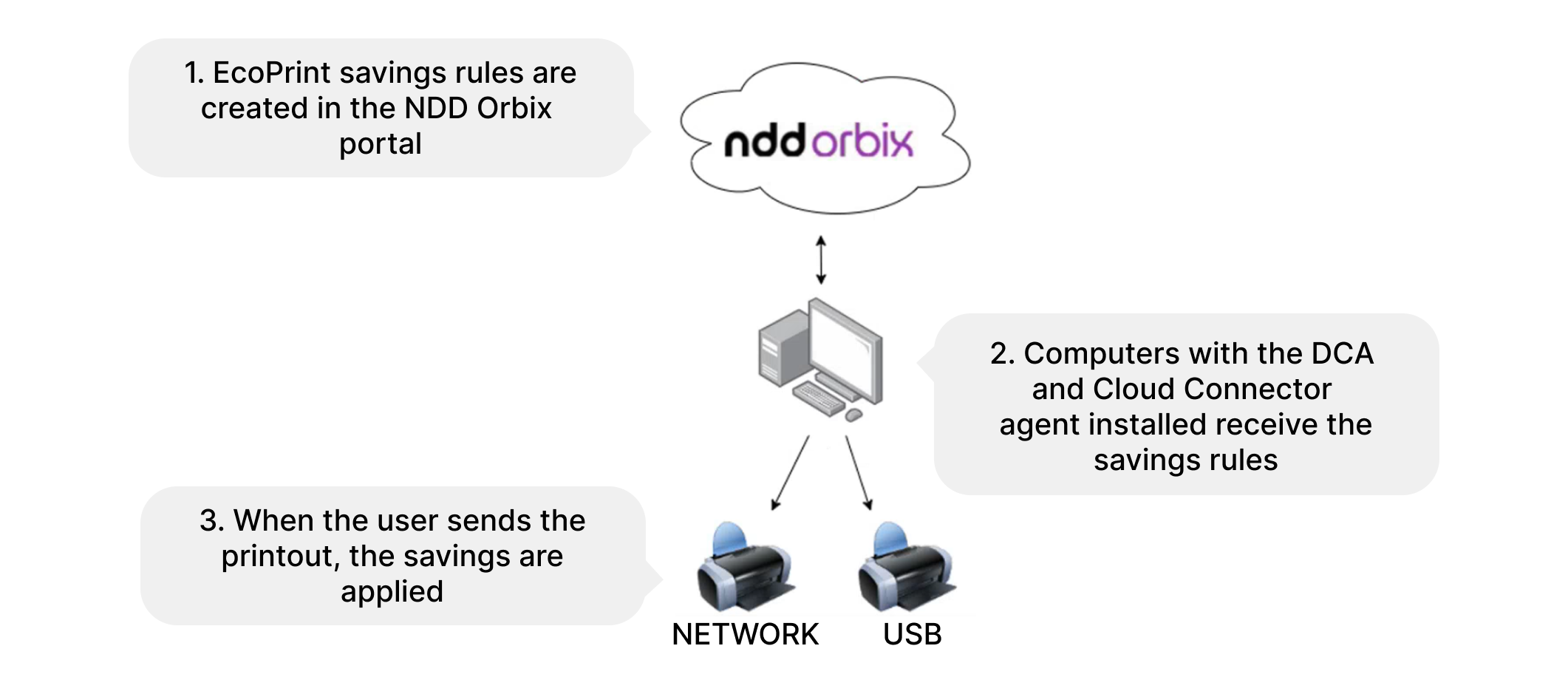
Control is centralized, application is automated, and results can be monitored with total visibility through the NDD Orbix portal.
EcoPrint in NDD Orbix is much more than a saving feature: it is a strategy for sustainability and operational efficiency, offering control, predictability and competitive advantage without compromising quality.