
These are the April 2026 release notes of NDD Orbix.
See a summary of all updates and click on the links to navigate each one.
DCA and Cloud Connector agent (Windows version 1.2.19):
IMPROVEMENTS
FIXES
APPROVALS
NDD Orbix portal:
NEW FEATURES
IMPROVEMENTS
DCA and Cloud Connector agent (Windows version 1.2.18):
IMPROVEMENTS
FIXES
APPROVALS
April 28, 2026
Improvements
Update of the Microsoft .NET Runtime and Microsoft ASP.NET Core Runtime prerequisites to the latest version (Agent: DCA and Cloud Connector)
The Microsoft .NET Runtime and Microsoft ASP.NET Core Runtime prerequisites have been updated to version 8.0.26, the latest version in the 8 series. The new version includes security fixes for previous versions.
Warning
The DCA and Cloud Connector (Windows) agent must be updated to version 1.2.19, as instructed at Update the DCA and Cloud Connector agent, Gateway Connector, or services version via the portal.
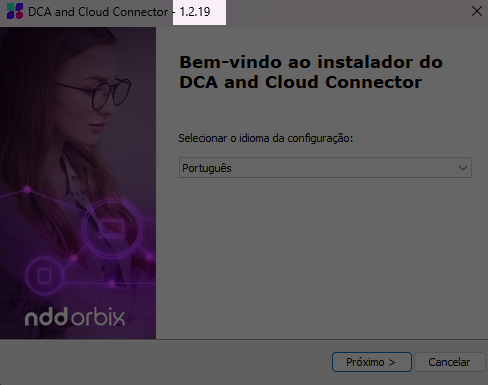
Display of the version to be installed on the installer screens (Agent: DCA and Cloud Connector)
To improve usability and make it easier to identify the version to be installed, all dialog screens in the DCA and Cloud Connector installer now display this information at the top of the interface, as shown below:
Warning
The DCA and Cloud Connector (Windows) agent must be updated to version 1.2.19, as instructed at Update the DCA and Cloud Connector agent, Gateway Connector, or services version via the portal.
Improvements to the uninstallation process for DCA and Cloud Connector when prerequisites are not installed (Agent: DCA and Cloud Connector)
In scenarios where the Microsoft .NET Runtime and Microsoft ASP.NET Core Runtime prerequisites were removed after the agent was installed, the uninstallation process performed by the installer (.exe) required these components to be reinstalled before proceeding.
In these scenarios, it is no longer necessary to reinstall the prerequisites to uninstall the agent, allowing the process to run directly.
Warning
The DCA and Cloud Connector (Windows) agent must be updated to version 1.2.19, as instructed at Update the DCA and Cloud Connector agent, Gateway Connector, or services version via the portal.
Fixes
Error loading supplies for the Brother DCP-L5602DN printer (Service: NDD - Printer Monitor)
When capturing supply data from the Brother DCP-L5602DN printer, the data returned by the printer in hexadecimal format was not interpreted correctly, causing a conversion error.
To fix this, we made an adjustment to the processing and decoding of the hexadecimal data so that the information is interpreted correctly.
Warning
The DCA and Cloud Connector (Windows) agent must be updated to version 1.2.19, and the NDD - Printer Monitor (Windows) service to version 1.1.32, as instructed at Update the DCA and Cloud Connector agent, Gateway Connector, or services version via the portal.
Approvals
Approved network printers (Service: NDD - Printer Monitor)
|
|
Meters capture |
Supplies capture |
|
HP |
LASER 335dw |
LASER 335dw |
|
Pantum |
BM4240ADW |
BM4240ADW |
Warning
The DCA and Cloud Connector (Windows) agent must be updated to version 1.2.19, and the NDD - Printer Monitor (Windows) service to version 1.1.32, as instructed at Update the DCA and Cloud Connector agent, Gateway Connector, or services version via the portal.
Adjusted network printers models (Service: NDD - Printer Monitor)
|
Brother |
DCP-L5602DN |
Warning
The DCA and Cloud Connector (Windows) agent must be updated to version 1.2.19, and the NDD - Printer Monitor (Windows) service to version 1.1.32, as instructed at Update the DCA and Cloud Connector agent, Gateway Connector, or services version via the portal.
Approved USB printers (Service: NDD - Printer Monitor USB)
|
|
Meters capture |
Supplies capture |
|
HP |
LASER MFP 330¬355sdnw
|
LASER MFP 330¬355sdnw
|
|
Epson |
L6170-L6171
|
L6170-L6171 |
|
Brother |
MFC-L6912DW |
MFC-L6912DW |
|
Xerox |
VERSALINK B605-B605S MFP |
- |
Incompatible printers:
-
HP OFFICEJET 200 MOBILE
Warning
The DCA and Cloud Connector (Windows) agent must be updated to version 1.2.19 and the NDD - Printer Monitor USB (Windows) service to version 1.1.20, as instructed at Update the DCA and Cloud Connector agent, Gateway Connector, or services version via the portal.
April 22, 2026
New features
New computer report
We have released the new predefined report Tactical computer inventory, which provides a consolidated view of the devices being monitored in the customer’s environment.
The report combines indicators from physical inventory, technical inventory, and software inventory, allowing a comprehensive analysis of the distribution, performance, and compliance of the monitored computers.
Additionally, you can enable the detailed view, which displays individual lists of computers requiring attention, such as those without communication, with hardware overuse, with degraded batteries, with forbidden software installed, and with outdated antivirus.
To generate the report, access the Reports > Predefined menu, click the Tactical computer inventory report, and configure the following filters:
-
Customer (mandatory): defines the customer whose data will be displayed.
-
Site (optional): allows you to select a specific site. When no site is selected, the report will display data from all sites of the customer.
-
Department (optional): allows you to select a specific department. When no department is selected, the report will display data from all departments of the customer’s site.
-
Include detailed view (mandatory): when enabled, adds detailed lists of computers requiring attention to the report.
This report simplifies the monitoring of the computer fleet at different levels (customer, site, and department) and supports operational and strategic decision-making.
For more information, access the documentation Generate predefined reports.
Improvements
New method for obtaining computer location
In addition to existing geolocation methods, NDD Orbix now uses detectable nearby Wi-Fi networks to determine a computer’s location, even when it is connected via an Ethernet cable.
With this improvement, the agent automatically selects the best available location option, ensuring greater accuracy and consistency regardless of the connection type. Prioritization works as follows:
-
Connected Wi-Fi network: when the computer is connected to a Wi-Fi network, the location is obtained through triangulation of the connected network and other visible Wi-Fi networks, using the Wi-Fi-based Google API.
-
Available nearby Wi-Fi networks: when the computer is connected via an Ethernet cable but there are detectable nearby Wi-Fi networks, the location is obtained by triangulating these visible networks using the Google Wi-Fi-based API.
-
No Wi-Fi connected or available: when the computer is connected via an Ethernet cable and no Wi-Fi networks are detectable, or when the Wi-Fi adapter is disabled, the location is estimated based on the device’s public IP address, using the ipapi API.
This update significantly improves the accuracy of location information and ensures greater consistency in the geographic data of monitored devices.
Automatic synchronization of computer names on the portal
To ensure greater consistency of information and alignment with the actual environment, whenever a computer’s name is changed in the operating system, the new name will be automatically detected and updated on the NDD Orbix portal.
April 13, 2026
Improvements
Improvements in data collection from computers without a model (Services: NDD - Computer Monitor and NDD - Software Monitor)
We implemented a fallback process for situations where the computer does not have an identified model. In these cases, the system automatically collects the motherboard model and manufacturer information, using it as a reference to fill in the necessary data. This ensures that the mandatory properties are present and the computer can be created correctly.
Warning
The DCA and Cloud Connector (Windows) agent must be updated to version 1.2.18, the NDD - Computer Monitor (Windows) service to version 1.4.5, and the NDD - Software Monitor (Windows) service to version 1.2.2, as instructed at Update the DCA and Cloud Connector agent, Gateway Connector, or services version via the portal.
Fixes
Removal of the PawnIO driver (Service: NDD - Computer Monitor)
We have completely removed the PawnIO driver from the DCA and Cloud Connector agent.
As a result, the collection of hardware temperature data has been temporarily disabled. Consequently, temperature-related alerts will no longer be generated, due to the unavailability of data for processing.
Warning
The DCA and Cloud Connector (Windows) agent must be updated to version 1.2.18, and the NDD - Computer Monitor (Windows) service to version 1.4.5, as instructed at Update the DCA and Cloud Connector agent, Gateway Connector, or services version via the portal.
Failure in disk collection when the primary search returned an error (Service: NDD - Computer Monitor)
During disk collection, the system initially used the primary search. However, when an error occurred in the primary search, the system did not execute the secondary search as a fallback, causing the disk search to fail without attempting the available alternative.
To fix this, we adjusted the error-handling logic of the primary search to ensure that, in case of a failure, the secondary search is executed correctly as a fallback.
Warning
The DCA and Cloud Connector (Windows) agent must be updated to version 1.2.18, and the NDD - Computer Monitor (Windows) service to version 1.4.5, as instructed at Update the DCA and Cloud Connector agent, Gateway Connector, or services version via the portal.
Approvals
Approved network printers (Service: NDD - Printer Monitor)
|
|
Meters capture |
Supplies capture |
|
HP |
LASER MFP 355sdnw |
LASER MFP 355sdnw |
|
Konica |
MINOLTA BIZHUB C301i |
MINOLTA BIZHUB C301i |
|
Xerox |
ALTALINK C8230
|
ALTALINK C8230
|
Warning
The DCA and Cloud Connector (Windows) agent must be updated to version 1.2.18, and the NDD - Printer Monitor (Windows) service to version 1.1.31, as instructed at Update the DCA and Cloud Connector agent, Gateway Connector, or services version via the portal.
Adjusted network printers models (Service: NDD - Printer Monitor)
|
HP |
COLOR LASERJET FLOW E8766 |
Warning
The DCA and Cloud Connector (Windows) agent must be updated to version 1.2.18, and the NDD - Printer Monitor (Windows) service to version 1.1.31, as instructed at Update the DCA and Cloud Connector agent, Gateway Connector, or services version via the portal.